
View all posts

What’s New – QuickCloud Managed Database HA Cluster
Three nodes, three separate hosts and one connection address – with management, encryption and backups included.
QuickCloud Managed Database HA Clusters are now available for PostgreSQL 17, MariaDB 11.8 and Valkey 8.1, the Redis-compatible in-memory store.
Create a cluster from the QuickCloud panel and connect your application to a single hostname. Behind that address, QuickCloud runs three database nodes on three separate physical hosts in our UK data centre. If the leader or its host fails, the surviving nodes handle failover and your application reconnects to the same address within seconds.
We manage the nodes, replication, monitoring, patching and backups. You manage your databases, users and application connections.
One address, three separate hosts
A cluster gives your database three nodes, each with dedicated CPU and memory on a different physical host. Placement is enforced when the cluster is built: QuickCloud will only create it when three separate hosts have capacity.
One node acts as the leader and serves your application’s connections. The other two receive replicated data and provide the redundancy needed to survive the loss of any one node.
Your application connects to db-<name>.quickdb.uk. That hostname points to a floating IP address held by the current leader. When leadership changes, the address moves with it. The hostname and IP stay the same, including when a failed node is rebuilt.

What happens when a node fails?
If the leader becomes unavailable, the remaining nodes select a new leader and move the floating address to it. Your application briefly loses its connection, then reconnects using its existing connection details.
This takes seconds. In pre-launch testing, planned switchovers completed in around 10 seconds. That is an observed result, rather than a fixed recovery-time guarantee; applications should be configured to reconnect and retry appropriately.
The cluster handles this itself. Leadership, failover and address movement run between the nodes, independently of the QuickCloud panel. The panel creates and monitors your cluster, but customer database traffic does not pass through it.
QuickCloud rebuilds failed nodes, which rejoin the cluster and synchronise with the remaining members. Email alerts can keep you informed about failover, node failures and recovery.

Choose the engine that fits your application
PostgreSQL 17
PostgreSQL uses Patroni and synchronous streaming replication. A write is confirmed only after a synchronous standby has received the transaction, protecting committed data during the supported single-node failover. The third node provides an additional replica.
MariaDB 11.8
MariaDB uses Galera replication, with a single writer exposed through the connection address. Write sets are certified by the cluster before writes are acknowledged. If the serving node fails, another synchronised member takes over, protecting committed data during the supported single-node failover.
Valkey 8.1
Valkey is a Redis-compatible option for caching, sessions and queues. A primary and two replicas work with Sentinel to handle failover. Replication is asynchronous, so recent writes may be lost if the primary fails before they reach a replica. Choose it with that behaviour in mind, particularly for sessions and queues where losing a recent update may matter.
Management included
Every cluster includes dedicated CPU and memory for each node, with no resource overcommit. QuickCloud operates the underlying nodes, so there is no operating system to maintain or cluster software for you to configure.
From the panel, you can create users and databases, assign access levels, copy connection details and inspect cluster health. The Nodes tab shows the leader, replicas and synchronisation state. A planned switchover lets you move leadership to the eligible synchronised standby when you need to.
For PostgreSQL and MariaDB, you can also manage users and databases directly over SQL as the admin user. The panel reads the actual database state, so changes made through SQL appear there too. Custom SQL grants are identified and preserved.
Alerts cover failover, unavailable nodes, backup problems, delayed archives and storage usage, with recovery notifications when the issue clears.
Encryption and controlled access
TLS is required for client connections. Each node’s data disk is encrypted, and backups are encrypted with the cluster’s own key before leaving the node. Replication, consensus and health checks use a private encrypted network between the three nodes.
Choose public access with an allowed-address list, or attach the cluster to your private network. Public access is restricted by default, and the panel lets you manage permitted addresses and database permissions.
Seven-day point-in-time recovery
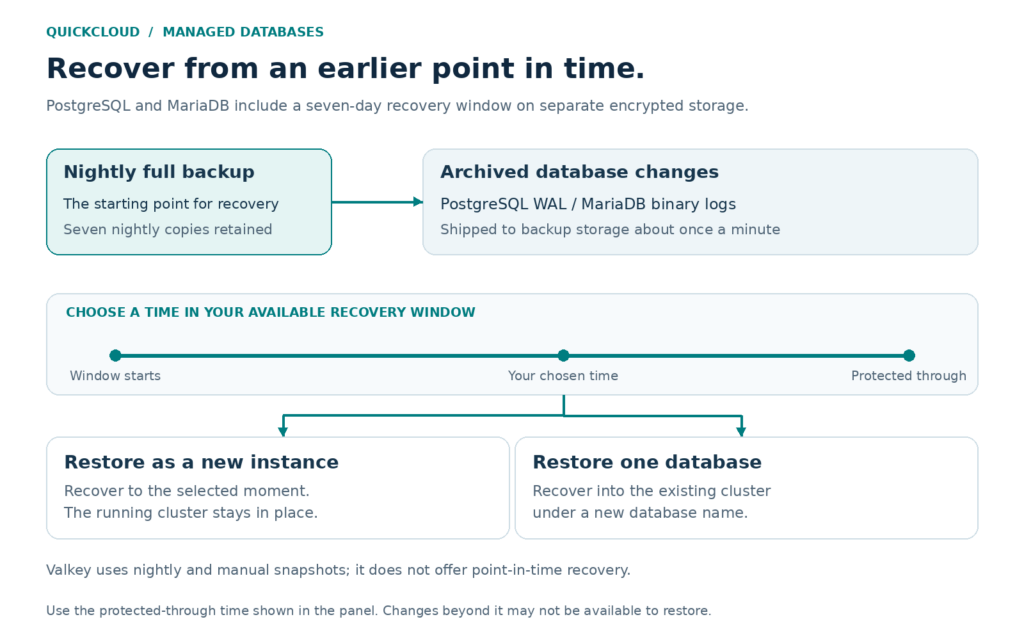
PostgreSQL and MariaDB include nightly full backups and a seven-day point-in-time recovery window. Database changes are archived to separate backup storage about once a minute. The Backups tab shows your available recovery window and the time through which your data is protected.
You can restore to a chosen moment as a new instance, leaving the running cluster in place. Alternatively, restore one database into the existing cluster under a new name. This gives you a way to recover from an accidental change while preserving the current database for comparison.
Valkey includes nightly and manual snapshots. It does not offer point-in-time recovery.
What the cluster protects against
These clusters are designed to survive the loss of any one database node or physical host. All three hosts are in one UK site, so this is host redundancy rather than geographic or cross-site redundancy.
Applications should expect a short interruption during failover or a restart that requires reconnection. The replicas provide availability; a separate read-only endpoint for read scaling is not currently offered.
Ready in minutes, billed hourly
To get started, open Managed Databases in QuickCloud, choose HA Database Cluster, select your engine and size, then configure public or private access. The cluster builds automatically, with progress shown for each node.
Once it is ready, the Connect tab provides connection details and a downloadable CA certificate. Store the admin password securely when it is first shown.
Each size displays the all-in hourly price and monthly maximum for the whole cluster. Management, dedicated resources, database storage and the included backup and recovery features are covered in that figure.
Related Articles...